Introduction
Welcome to ABP React - A modern, high-performance React-based frontend solution for ABP Framework applications. This documentation will guide you through setting up, developing, and deploying your application with this powerful template.
What is ABP React?
ABP React is a comprehensive React UI implementation that serves as a drop-in replacement for the default Angular UI in ABP Framework applications. It combines the power of React's component-based architecture with ABP's enterprise-grade features to deliver:
- 🚀 Superior Performance: Built with Next.js for optimal performance and SEO
- 🎨 Modern UI/UX: Responsive design with Tailwind CSS and customizable theming
- 🔐 Enterprise Security: Full ABP authentication and authorization integration
- 🌐 Multi-tenant Ready: Built-in support for multi-tenancy scenarios
- 🛠️ Developer Experience: TypeScript support with comprehensive tooling
Key Features
Authentication & Authorization
- JWT-based authentication with ABP Identity
- Role-based access control (RBAC)
- Permission-based authorization
- Password policies and two-factor authentication
- Social login integration
Multi-tenancy
- Host and tenant management
- Tenant isolation and data segregation
- Tenant-specific configurations
- Tenant switching capabilities
User Management
- Complete user lifecycle management
- Profile management with customizable fields
- Role assignment and management
- User permissions and feature access
Content Management System (CMS)
- Visual Page Builder: Drag-and-drop interface powered by Puck
- Component Library: 20+ pre-built content blocks
- Real-time Preview: See changes instantly as you build
- Responsive Design: Built-in mobile-first design tools
- Comment System: User engagement and moderation
- Menu Management: Dynamic navigation with visual builder
- Multi-tenant Support: Tenant-specific content isolation
Modern Development Stack
- Next.js 14+: React framework with App Router
- TypeScript: Full type safety and IntelliSense
- Tailwind CSS: Utility-first styling framework
- shadcn/ui: High-quality, accessible UI components
- React Hook Form: Performant form handling
- Zustand: Lightweight state management
- Puck: Visual page builder for content creation
Quick Start
Prerequisites
Ensure you have the following installed:
- Node.js (26.12.1, pinned in
.node-version) - pnpm (recommended package manager)
- .NET 8 SDK
- ABP Framework (latest version)
Installation
- Install the ABP React Template
dotnet new install Anto.Abp.React.Template
- Create a New Project
dotnet new abp-react -o my-awesome-app --apiUrl https://your-api-url.com
💡 Tip: Use kebab-case for project names (e.g.,
my-awesome-app) as it will be used for package organization.
- Navigate and Install Dependencies
cd my-awesome-app
pnpm install
- Configure Environment
cp .env.sample .env
Update the .env file with your specific configuration:
NEXTAUTH_URL=http://localhost:3000
NEXTAUTH_SECRET=your-secret-key
NEXT_PUBLIC_API_URL=https://your-api-url.com
- Start Development Server
pnpm dev
🎉 Your application will be available at http://localhost:3000
Architecture Overview
ABP React follows a clean architecture pattern with clear separation of concerns:
src/
├── app/                    # Next.js App Router pages
├── components/            # Reusable UI components
├── hooks/                 # Custom React hooks
├── lib/                   # Utilities and configurations
├── client/               # API client and services
└── layout/               # Layout components
What's Next?
Now that you have ABP React running, explore these key areas:
- Project Structure - Understand how the project is organized
- Authentication - Set up user authentication
- Components - Explore available UI components
- API Integration - Connect to your ABP backend
- Deployment - Deploy your application
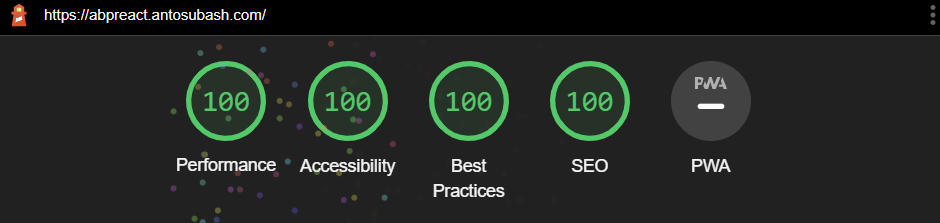
Performance Highlights
ABP React is designed for optimal performance:
- Lighthouse Score: 95+ across all metrics
- Bundle Size: Optimized with tree-shaking and code splitting
- SEO Ready: Server-side rendering with Next.js
- Accessibility: WCAG 2.1 AA compliant components
Community & Support
Join our growing community:
- GitHub: Issues and Discussions
- Discord: Community Chat
- Email: antosubash@outlook.com
Contributing
We welcome contributions! Whether it's bug fixes, new features, or documentation improvements, every contribution helps make ABP React better.
- Contributing Guide - Learn how to contribute
- Code of Conduct - Our community standards
- Development Setup - Set up your development environment
Ready to build amazing applications with ABP React? Let's get started! 🚀